Posts

Image
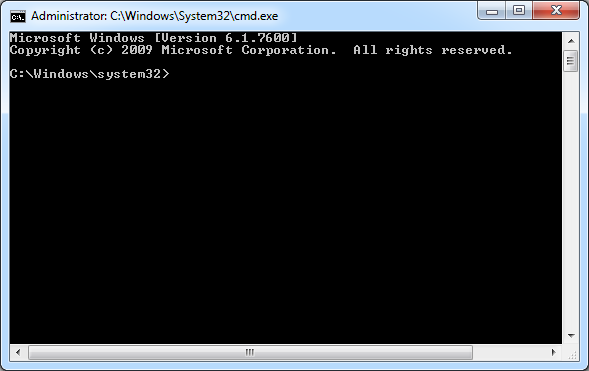
HOW TO RELEASE/RENEW YOUR IP ADDRESS Do you having problem with your internet access? Did you try to find the cause of the problem. Here is one of the method for troubleshooting your internet/Lan connection. Please Note that this option only available for dynamic IP address configuration through DHCP (Dynamic Host Configuration Protocol) server. STEP 1 : Enter Command Prompt STEP 2 : Type “ipconfig /release” then click ENTER. You must wait until you get the C:\Windows\system32> again STEP 3 : Then Type “ipconfig /renew” , click Enter After all load finish. Then you can try accessing your internet again. If your internet still have problem. Try different method on troubleshooting the internet problem.
Image
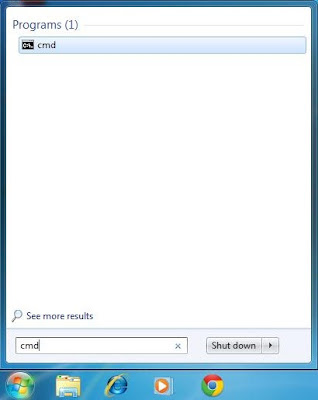
  HOW TO CHECK YOUR COMPUTER’S IP ADDRESS AND MAC ADDRESS (PHYSICAL ADDRESS) STEP 1 : Go to command prompt line by typing “cmd” like below picture. STEP 2 : You will see screen like this. STEP 3 : Type “ipconfig /all” STEP 4 : You will see information like Ipv4 address field is your computer IP address While the Physical Address field is your MAC address.
Image
HOW TO TURN OFF THE GUEST USER ACCOUNT IN WINDOWS 7 Guest user account is used for temporary access for several computer resources like internet, printers and accessing the network. By turning ON the guest account, computer users are more vulnerable to the threats of the internet. Let take a simplest way to delete/disable the guest account in windows 7. STEP 1 : Enter the Control Panel and Click “ User Accounts and Family Safety ” STEP 2 : Click “ User Accounts ” STEP 3 : Click “ Manage another account ” STEP 4 : Click “ Guest Account ” STEP 5 : Click “ Turn off the guest account" That is the simplest way! If you want to turn ON the guest account. You just need to follow until step four (4) then below screen will appear for you to enable the guest account.
Image
HOW TO REMOVE/DELETE THE MOST VISITED PAGE ON GOOGLE CHROME BROWSER? This is how to do it! FIRST STEP : Open the new tab. You will see screen like below picture. SECOND STEP : Drag the page you want to remove/delete. While dragging you will SEE the “ Remove from Chrome ” Option at the bottom side of the browser. THIRD STEP : Drag the page you want to remove/delete COMPLETELY to that Recycle Bin Icon. Then your visited website is securely REMOVED / DELETED.

How to Hide Recycle Bin

Image
How to Hide Recycle Bin The Recycle Bin is by default appears on the desktop. The question is, can you hide the Recycle Bin? The answer : YES you can. Step To show or hide the Recycle Bin on the desktop Click the Start button 2. Click Control Panel - Appearance and Personalization – Personalization. (view by Category) In the left panel, click Change desktop icons. Then do one of the following: To remove the Recycle Bin from the desktop, clear the Recycle Bin check box. To display the Recycle Bin on the desktop, select the Recycle Bin check box. Click OK. Note Even if you don't choose to show the Recycle Bin, deleted files will still be temporarily moved to the Recycle Bin until you choose to permanently delete them. To turn off the Recycle Bin, see Disable Recycle Bin settings.